



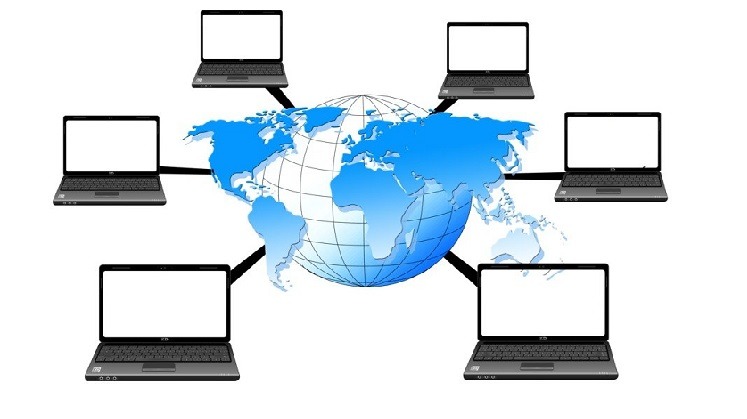
A computer network is any group of devices connected to share data and resources. Networks are usually classified by geographic scope, Personal (PAN), Local (LAN), Campus (CAN), Metropolitan (MAN), and Wide (WAN), but other classifications add wireless LANs (WLAN), virtual LANs (VLAN), virtual private networks (VPN), and storage-area networks (SAN), depending on whether you’re classifying by scope, connection method, or purpose. There’s no single “correct” number of network types, it depends on which classification system you’re using.
What Is a Computer Network?
A computer network is two or more devices, computers, phones, servers, printers, sensors, connected so they can share data and resources. The connection can be physical, like an Ethernet cable, or wireless, like Wi-Fi or Bluetooth.
Every network you’ve ever used, from your home Wi-Fi to the Internet itself, is built from the same basic idea: devices, links between them, and rules (protocols) for how they talk to each other. What changes between network types is scale, ownership, technology, and purpose.
How Many Types of Networks Are There?
There isn’t one universally agreed-upon number, and any article that claims otherwise is oversimplifying. That’s because “type of network” can mean different things depending on what you’re classifying by:
- By geographic scope — how large an area the network covers. This is the most common classification and gives you PAN, LAN, CAN, MAN, and WAN.
- By transmission medium — whether devices connect by cable or over the air (wired vs. wireless).
- By architecture — how devices relate to each other (client-server vs. peer-to-peer).
- By logical/virtual segmentation — networks built as software-defined layers on top of physical infrastructure (VLAN, VPN).
- By specialized purpose — networks built for one specific job, like storage (SAN).
So when someone asks “how many types of networks are there,” the honest answer is: it depends which lens you’re using. The rest of this guide walks through each one.
Types of Networks by Geographic Scope
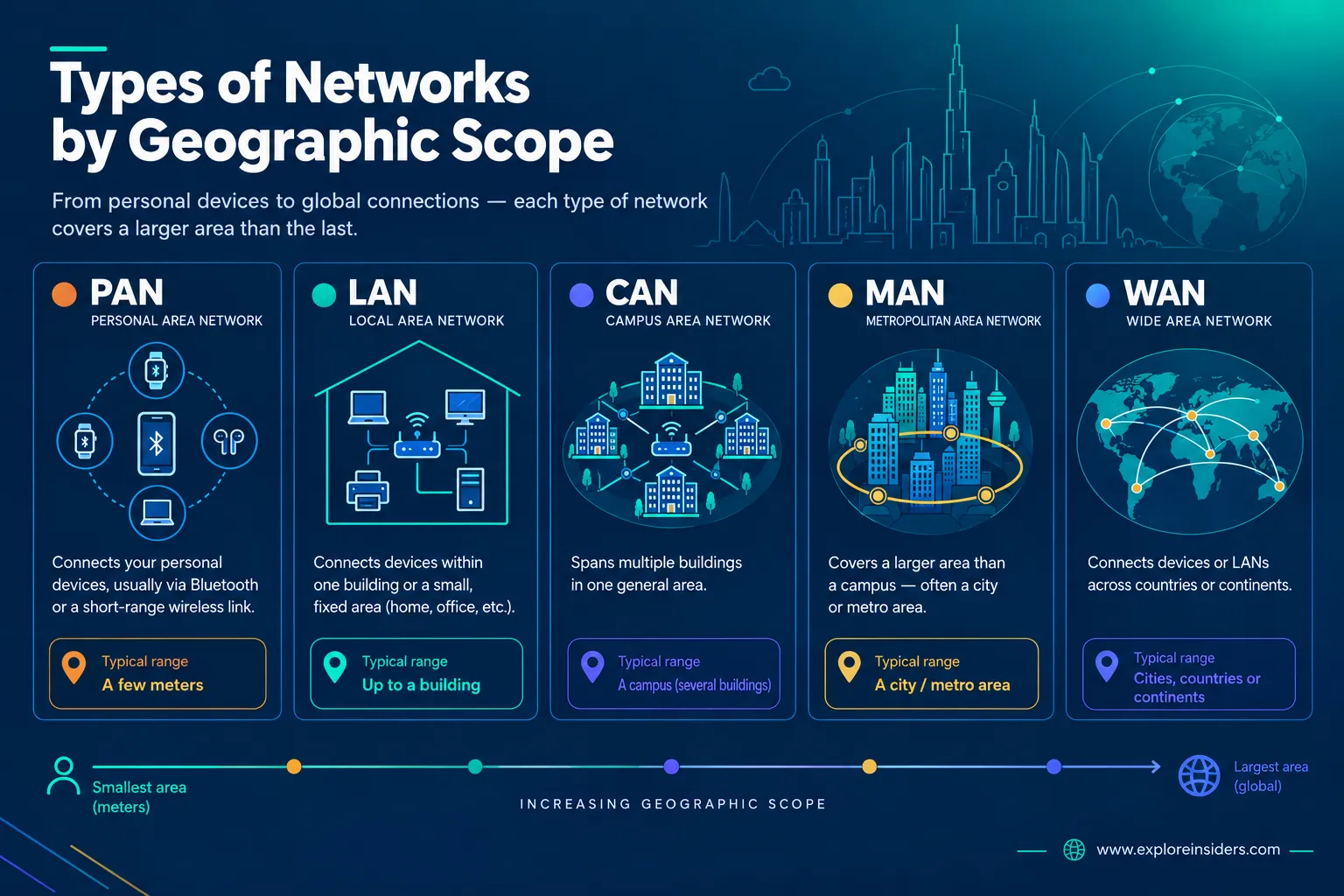
This is the classification most textbooks lead with, and it’s a useful mental model: each step up covers more physical distance.
PAN — Personal Area Network
What it is: The smallest network category, built around a single person’s immediate devices.
Typical range: A few meters.
How it works: Devices connect directly to each other, usually via Bluetooth or a short-range wireless link, without needing a router or central hub.
Example: Your phone connected to a smartwatch and a pair of wireless earbuds.
Common uses: Syncing personal devices, wireless peripherals (keyboard, mouse), file transfer between nearby devices.
LAN — Local Area Network

What it is: A network confined to one building or a small, fixed area, a home, office, or single school building.
How it works: Devices connect through switches and routers, either by Ethernet cable or Wi-Fi (a wireless LAN is its own sub-category, see below).
Example: Your home network, or the office network at a small business.
Common uses: File and printer sharing, internal business systems, connecting to the internet through a shared router.
CAN — Campus Area Network
What it is: A network that spans multiple buildings in one general area, larger than a single LAN, but still geographically contained.
How it works: Several building-level LANs are connected, typically over infrastructure the organization owns or leases.
Example: A university connecting its library, dormitories, and academic buildings into one network.
Common uses: Universities, hospital campuses, corporate office parks with multiple buildings.
MAN — Metropolitan Area Network
What it is: A network that spans a larger area than a campus, often a city or a significant part of one.
How it works: Typically built and maintained by a single organization (an ISP, a city government, or a large company) connecting multiple LANs across that area, often over fiber.
Example: A city government network connecting municipal buildings across town.
Common uses: City infrastructure, regional ISPs, large organizations with multiple sites in one metro area. In practice, the line between a MAN and a small WAN is often blurry, and the term is used less often today than LAN or WAN.
WAN — Wide Area Network
What it is: A network that connects devices or LANs across a large geographic area, cities, countries, or continents.
How it works: WANs rely on infrastructure leased or shared across multiple providers, since no single organization typically owns the physical links spanning that much distance.
Example: A company connecting its offices in different countries into one corporate network.
Common uses: Enterprise connectivity between branch offices, ISP backbone networks.
A quick but important distinction: the Internet is not itself a WAN, it’s a global network of networks, made up of countless interconnected WANs, LANs, and other networks run by different organizations worldwide. Calling the Internet “a WAN” oversimplifies what’s actually a much larger, decentralized system.
Wired vs. Wireless Networks
Geographic scope isn’t the only way to classify a network, you can also classify by how devices connect.
Wired networks use physical cables (typically Ethernet) to connect devices. They’re generally faster and more stable, less prone to interference, and easier to secure physically, but they’re less flexible, since devices have to stay tethered or within reach of a cable run.
Wireless networks connect devices over radio waves instead of cables. The most common example is Wi-Fi, which creates a WLAN (Wireless Local Area Network), functionally the same as a LAN, just without the cables.
A wireless LAN isn’t the same thing as “the internet,” even though people use the terms loosely. Here’s how they actually relate:
Device → Wi-Fi/WLAN → Router or Access Point → LAN/WAN → Internet
Your phone connects to your Wi-Fi (a WLAN). That WLAN is part of your home’s LAN. Your router then connects that LAN out to your Internet Service Provider’s WAN, which in turn connects to the broader Internet. Wi-Fi is the technology that gets your device onto the local network, it’s one link in a longer chain, not the internet itself.
Most home and office networks today are hybrids: wired connections for stationary equipment (desktops, servers, smart TVs) and wireless for everything else (phones, laptops, tablets).
Recommended: Best Modems and Routers of All the Times
Logical and Virtual Network Types
Some network types aren’t defined by physical distance at all, they’re defined by software-based segmentation layered on top of physical networks. This is a genuinely different axis from PAN/LAN/MAN/WAN, and it’s worth understanding as its own category.
VLAN — Virtual Local Area Network
What it is: A way of splitting one physical network into multiple logically separate networks, using switches configured to tag and separate traffic.
How it works: Devices on the same physical switch can be grouped into different VLANs so they can’t see each other’s traffic, even though they share the same cabling and hardware.
Example: An office building where the finance department, guest Wi-Fi, and general staff network all run over the same physical switches but are kept logically separate.
Common uses: Improving network security and performance by isolating traffic by department, function, or purpose without needing separate physical hardware for each group.
VPN — Virtual Private Network
What it is: A private, encrypted connection created over a public network, usually the Internet.
How it works: A VPN creates an encrypted “tunnel” between a device and a private network or server, so data traveling between them can’t easily be read by anyone else on the network in between.
Example: An employee working from home who connects to their company’s internal systems securely over the public internet.
Common uses: Secure remote access for employees, protecting data on public Wi-Fi, accessing region-restricted services.
Specialized Networks
SAN — Storage Area Network
What it is: A dedicated, high-speed network built specifically to connect servers to shared storage devices, not a general-purpose data network like a LAN or WAN.
How it works: Instead of general network traffic, a SAN moves block-level storage data between servers and storage hardware, so storage looks and behaves like it’s directly attached to each server, even though it’s centralized.
Example: A data center where multiple servers all access a shared pool of storage hardware over a dedicated SAN, rather than each server having its own separate drives.
Common uses: Enterprise data centers, cloud storage backends, environments where fast, centralized, and highly available storage matters more than general networking.
Comparison Table

| Network Type | Full Form | Typical Scope | Example | Common Use |
|---|---|---|---|---|
| PAN | Personal Area Network | A few meters, around one person | Phone + smartwatch + earbuds | Connecting personal devices |
| LAN | Local Area Network | One building or home | Home or office network | Internal file/resource sharing |
| WLAN | Wireless Local Area Network | Same as LAN, wireless | Home or office Wi-Fi | Wireless device connectivity |
| CAN | Campus Area Network | Multiple buildings, one site | University campus | Connecting buildings on one site |
| MAN | Metropolitan Area Network | A city or metro area | City government network | Regional infrastructure |
| WAN | Wide Area Network | Cities, countries, continents | Company offices across countries | Long-distance connectivity |
| VLAN | Virtual Local Area Network | Logical, not physical | Segmented office network | Traffic isolation/security |
| VPN | Virtual Private Network | Logical, over any network | Remote employee access | Secure/private connections |
| SAN | Storage Area Network | Dedicated infrastructure | Data center storage pool | Centralized, high-speed storage |
A Quick Note on Network Cables
Most wired networks, LANs especially, run on Ethernet cabling, with common categories like CAT5e, CAT6, and CAT6a offering different speed and distance capabilities. Cable choice affects performance more than most people realize, but it’s a big enough topic to deserve its own dedicated guide rather than a rushed summary here. (Link to a future “Types of Network Cables” article.)
FAQs
What are the different types of networks?
The most common classification is by geographic scope: PAN, LAN, CAN, MAN, and WAN. Other classifications add WLAN (wireless LANs), VLAN and VPN (logical/virtual networks), and SAN (storage networks).
What are the 4 main types of computer networks?
When people say “4 main types,” they usually mean PAN, LAN, MAN, and WAN, the core geographic-scope categories. Some sources add CAN as a fifth.
How many types of networks are there?
There’s no single fixed number, it depends on the classification system. By geographic scope, there are typically 4–5 (PAN, LAN, CAN, MAN, WAN). Including wireless, virtual, and specialized types adds several more (WLAN, VLAN, VPN, SAN).
What is a LAN?
A Local Area Network, a network confined to one building or a small area, like a home or office.
What is a WAN? A Wide Area Network, a network connecting devices or LANs across a large geographic area, like multiple cities or countries.
Is Wi-Fi a type of network?
Wi-Fi is a wireless technology used to create a WLAN (Wireless Local Area Network). It’s not a network type on its own, it’s how a wireless LAN connects its devices.
Is the Internet a WAN?
Not exactly. The Internet is a global network of networks, made up of countless interconnected WANs, LANs, and other networks, it’s much larger and more decentralized than any single WAN.
What is the difference between wired and wireless networks?
Wired networks connect devices with physical cables (typically Ethernet) and tend to be faster and more stable. Wireless networks connect over radio signals (typically Wi-Fi) and offer more flexibility and mobility, at some cost to raw speed and consistency.
What is a VLAN?
A Virtual Local Area Network, a way of logically separating traffic on a shared physical network, without needing separate physical hardware for each group.
What is a VPN?
A Virtual Private Network, an encrypted connection over a public network (usually the internet) that keeps data private between two points.
What is a SAN?
A Storage Area Network, a dedicated network built specifically to connect servers to shared storage hardware, rather than general-purpose data traffic.
Best Recommended Posts:
Why Should You Opt Fiber Optic Internet for Business
Cable vs. DSL vs. Fiber vs. Satellite Internet – Know the Difference
