



Originally published: April 14, 2020. Last updated: Oct 10, 2026.
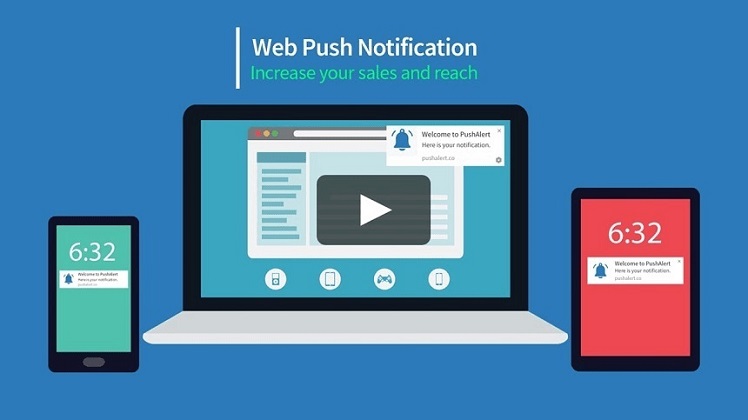
Web push notifications are clickable messages that arrive through the browser itself, appearing in a desktop corner or on a phone’s notification tray even when your website is not open. Unlike email, they demand attention the moment they arrive. Unlike SMS, they need no phone number and no app install. And unlike native app notifications, they work for any visitor who grants permission, which makes them one of the cheapest owned channels a business can build.
That last point is the commercial heart of the channel. Paid acquisition keeps getting more expensive, but a web push subscriber list is an audience you build once and can message at no cost with every send. This 2026 guide explains how web push notifications actually work, what changed on iPhone, how to earn opt-ins without irritating visitors, and which campaign types drive the most conversions, with current benchmarks behind every recommendation.
What Are Web Push Notifications?
A web push notification is a short, clickable message your website sends to a subscriber through their browser. The message is delivered by the browser vendor’s push service and displayed by the operating system, so it appears even when the subscriber is not on your site. Each notification carries a title, a short message, your site’s icon, and a link that opens when clicked. Many also support a large image and up to two action buttons, such as “Shop now” and “View details.”
The defining trait is permission. A visitor must explicitly agree to receive your notifications through the browser’s permission prompt before you can send anything, and they can revoke that permission at any time from their browser settings. That opt-in relationship is what makes the channel powerful: every subscriber has asked to hear from you, which is why engagement rates consistently beat email on a per-message basis. The trade-off is that the list grows more slowly than an email list, so the opt-in strategy matters enormously (see the best practices below).
How Web Push Notifications Work in 2026
Under the hood, web push rests on three web standards working together:
- Service workers. A small JavaScript file your site installs in the visitor’s browser that runs in the background, even when your site is closed. It listens for incoming push messages and displays them as notifications.
- The Push API. The standard that lets your server send a message to a subscriber’s browser through the browser vendor’s push service: Firebase Cloud Messaging for Chrome and Edge, Mozilla’s push service for Firefox, and the Apple Push Notification service for Safari.
- The Notifications API. The standard the service worker uses to render the visible notification: title, body text, icon, image, and action buttons.
Two setup requirements follow from this architecture. First, your site must run on HTTPS, because browsers only install service workers on secure origins. Second, your server identifies itself with a pair of VAPID keys (Voluntary Application Server Identification), a simple credential scheme that proves a push message genuinely comes from your site. Most push providers handle the key management and the service worker for you, so non-technical teams can launch without writing code.
Browser and Platform Support in 2026
Support is broad but not uniform, and the iPhone is the big exception every marketer must understand.
Desktop browsers: full support
Chrome, Edge, Firefox, and Safari on macOS all support web push notifications fully, including rich media and action buttons. A subscriber only needs to grant permission once; after that, notifications arrive whenever the browser is running, even if your site is closed.
Android: full support
On Android, Chrome, Edge, and Firefox deliver web push notifications that look and behave almost exactly like native app notifications, appearing in the system notification tray with your icon, image, and action buttons. Android remains the strongest platform for web push reach.
iPhone and iPad: Home Screen web apps only
This is the critical 2026 caveat. Apple added web push support in iOS and iPadOS 16.4 (March 2023), but only for web apps the user has added to the Home Screen. A site open in a regular Safari tab on iPhone cannot request notification permission at all: the Notification interface simply does not exist there, as OpenPWA’s compatibility reference documents.
For iOS web push to work, all of the following must hold: the user taps Share, then “Add to Home Screen,” and opens your site from that icon; your site serves a web app manifest with display set to standalone, fullscreen, or minimal-ui; the permission prompt is triggered by a direct user gesture such as tapping an “Enable alerts” button; and every push message is actually displayed, because Apple’s documentation warns that Safari revokes a site’s push permission if messages arrive without a visible notification. No Apple Developer Program membership is required.
Two recent developments improved the picture. Safari 18.4 introduced Declarative Web Push, a simpler delivery format that renders a notification without needing a service worker. And since iOS 26, every site added to the Home Screen opens as a web app by default instead of a plain bookmark, which removes one way the install used to fail quietly, according to an October 2026 status roundup.
The practical takeaway: on iPhone, treat web push as a loyalty channel for your most engaged users rather than a mass-reach channel, and pair it with email or SMS campaigns for the audience you cannot reach on iOS.
Web Push vs Email vs SMS
Each channel has a job. Here is how they compare:
| Web push | SMS | ||
|---|---|---|---|
| Opt-in effort | One click on a browser prompt | Typing an email address | Sharing a phone number plus written consent |
| Visibility | Appears instantly on screen | Sits in the inbox until opened | Appears instantly on screen |
| Cost per send | Free | Nearly free | Paid per message |
| Message length | Short: title plus one or two lines | Unlimited | 160 characters per segment |
| Rich media | Images and action buttons | Full HTML design | Links only (images need MMS at higher cost) |
| Best for | Timely nudges: price drops, flash sales, new posts | Longer stories, newsletters, receipts | Urgent, high-value alerts |
The winning strategy is rarely one channel alone. Use web push for the instant nudge, email for the fuller story, and SMS for the messages that cannot wait. For the SMS side of that mix, see our guides to retail text message marketing and SMS marketing for restaurants.
2026 Web Push Benchmarks: What Good Looks Like
Benchmarks keep expectations honest. The figures below come from vendor-published 2026 reports, so treat them as directional rather than gospel, but they are the best current data available:
- View rate: PushEngage’s 2026 benchmark report, based on 500 billion notifications across 75,000 sites, puts the median view rate at 38.1% among established senders.
- Click-through rate: the same report finds a median CTR of 2.29% on viewed notifications and 0.81% on sent notifications. Top-decile senders reach 6.35% CTR on views, about eight times the bottom decile. CTR on views rose 37% year over year.
- Broadcast vs segmented vs triggered: Relaybell’s benchmark guide finds broadcast sends to a whole list typically land at 1 to 4% CTR, segmented campaigns reach 5 to 10% or higher, and triggered or transactional pushes (cart reminders, order updates) can climb into double digits. PushEngage’s data agrees: triggered campaigns deliver a 3.00% CTR on sent, more than six times the all-sends baseline.
- Ecommerce: Tencent’s 2026 ecommerce guide reports an average CTR of 4.6% (11.4% for top performers) and cart abandonment recovery rates of 12% on average, 26% for top performers.
- Opt-in rates: MoEngage reports an average web push opt-in rate of around 5%, with Chrome accounting for 74.1% of opt-ins, Firefox 8.9%, and Safari 6.3%. Targeted and contextualized pushes can reach up to 20% CTR.
- Rich media lift: LumaPush’s analysis of over 500 million delivered notifications finds rich push notifications (image plus action buttons) deliver up to 2.4 times the CTR of plain text alerts, and that offering two action choices lifts engagement 44% over a single click destination.
- Revenue impact: a 2026 Sleeknote study cited by Pushly found that 35% of subscribers who click a promotional web push go on to complete a purchase, compared with roughly 5% for email clicks.
One pattern runs through every dataset: relevance beats volume. Segmented and triggered notifications outperform generic broadcasts by multiples, which is why the practices below focus on earning the right subscribers and sending the right message.
7 Web Push Best Practices That Increase Conversions
1. Use a soft ask before the browser prompt
The single most important opt-in decision is the two-step (soft ask) flow. Instead of firing the browser’s native permission dialog the moment someone arrives, first show your own custom prompt that explains the value: “Get notified when prices drop on items you viewed,” with “Enable alerts” and “No thanks” buttons. Only when the visitor clicks yes do you trigger the native browser prompt, as Relaybell’s opt-in guide and Pushwoosh’s documentation both recommend.
The reason is unforgiving mechanics: if a visitor dismisses your custom prompt, you can ask again later. If they block the native browser prompt, recovering that permission is extremely difficult. The soft ask also converts better because it sells the outcome first. NotifyPress’s web push playbook frames it well: permission is the whole game, so earn it with context.
2. Time the ask around intent, not arrival
Never request permission on the first page load. The visitor has not formed trust yet, and an instant dialog mostly produces blocks. Better moments: after the visitor reads an article, adds an item to the cart, spends 20 to 30 seconds on the site, scrolls past the fold, visits a second or third page, or returns for another session. SuprSend’s 2026 guide puts it simply: ask for permission in context, not on page load. High-intent pages such as product, pricing, and back-in-stock pages are ideal, because the alert has obvious utility there.
3. Keep messages short and specific
A push notification is a glance, not a reading session. Put the benefit in the first few words, name the product or offer concretely, and end with one clear call to action. Short copy wins: a 2026 industry roundup citing OneSignal’s analysis of 4.7 billion notifications reports that messages of seven words or fewer generated a 94% engagement lift over messages longer than fifteen words. “Price dropped: the headphones you viewed are now $79. Shop now.” beats “We have an exciting update about our product range that you will not want to miss.”
Notifications with a large image and up to two action buttons consistently outperform plain text. LumaPush’s data shows up to 2.4 times the CTR for rich push, with image-plus-buttons formats reaching 8.8 to 13.5% CTR in their dataset. Use the image to show the product, not your logo, and make the buttons real choices (“Shop the sale” and “View details”) rather than decoration. Keep file sizes small so the notification renders instantly on slower connections.
5. Segment and personalize
One message for everyone is the fastest route to blocks. Segment subscribers by behavior: pages viewed, categories browsed, cart abandoners, past purchasers, and content topics read. Then personalize the message itself: the product name, the price, the article topic. Segmented campaigns reach 5 to 10% CTR or higher against 1 to 4% for whole-list broadcasts, and MoEngage reports targeted, contextualized pushes reaching up to 20%. Start with three segments (new subscribers, engaged browsers, past buyers) and expand from there. Our guide to lead segmentation covers the underlying discipline.
6. Automate triggered campaigns
The highest-ROI notifications are the ones you never send manually. Build automated flows for the moments that already carry intent:
- Cart abandonment: a reminder 30 to 60 minutes after abandonment, then a follow-up with an incentive. Average recovery sits around 12%, with top performers reaching 26%.
- Price drops and back in stock: alerts on products the subscriber viewed or wish-listed.
- Browse abandonment: a nudge featuring the category they spent time in.
- Post-purchase: order confirmations, shipping updates, and review requests.
- Welcome series: two or three messages that teach new subscribers what kinds of alerts to expect.
For the cart recovery playbook in detail, including how SMS complements these triggers, see how to reduce cart abandonment with SMS.
7. Respect frequency and offer control
Over-notifying is the fastest way to lose the opt-in, through browser-level blocks and OS-level muting alike. For most businesses, one to three notifications per week is a sustainable cadence; news publishers with breaking-news value can send more, but only if subscribers chose that intensity. Let subscribers pick topics at opt-in (order updates vs promotions vs new content) so each message arrives with consent behind it, and make unsubscribing one click. A smaller list that stays subscribed beats a larger list that mass-blocks you.
Web Push Use Cases That Drive Revenue
Ecommerce. Flash sale announcements, price-drop alerts, back-in-stock notifications, cart recovery, and shipping updates. Pair web push with your broader ecommerce marketing goals so each campaign maps to traffic, conversion, or retention.
Content and media. Breaking news alerts, new article notifications for followed topics, and push as a lower-friction alternative to email signup. News sites are the highest-volume web push senders, though their CTR runs below average, so topic-level opt-ins matter most here.
Services and SaaS. Trial expiry reminders, feature announcements, webinar invitations, and appointment reminders. For appointment-driven local businesses, compare notes with SMS marketing for restaurants on which reminders belong in which channel.
Travel and hospitality. Fare-drop alerts, booking reminders, and check-in notifications. Time these to the traveler’s timezone, the same discipline that governs send-time optimization everywhere.
Common Mistakes to Avoid
- Asking for permission on page load. The dialog appears before any trust exists; most visitors block it.
- Sending generic blasts to the whole list. Low relevance trains subscribers to ignore you, then block you.
- Ignoring the iPhone limitation. Planning iOS reach as if it worked like Android leads to inflated subscriber forecasts.
- No measurement. Track opt-in rate, view rate, CTR per campaign type, and revenue per send. A broadcast CTR around 2 to 3% is a normal band; the upside comes from targeting, not from chasing a magic number.
- Hiding the unsubscribe. A subscriber who cannot leave easily will block the domain instead, which is worse.
Conclusion
Web push notifications earn their place in the marketing mix with a simple proposition: an owned, free-to-message audience that sees your message the instant it arrives. The channel rewards the same discipline as every other: earn permission with a soft ask at the right moment, keep messages short and specific, segment by behavior, automate the triggered moments, and respect frequency. Do that, and the benchmarks stop being surprising: triggered, relevant pushes convert at multiples of generic broadcasts. Fit web push into your wider plan for reaching customers through digital marketing, and it becomes one of the highest-ROI lines in your retention strategy.
Frequently Asked Questions
Do web push notifications work on iPhone?
Only partially. Since iOS 16.4, web push works on iPhone and iPad, but only for web apps the user has added to the Home Screen, not for sites open in a regular Safari tab. The user must install the web app, and the permission request must follow a direct tap. Plan iPhone reach as a loyalty channel for engaged users, not a mass channel.
What is the difference between web push and app push notifications?
Web push notifications come from a website through the browser and require no app install; app push notifications come from a native mobile app the user installed. Web push works on desktop and Android fully, and on iPhone only for Home Screen web apps. App push offers deeper OS integration but requires the user to download and keep your app.
What is a good click-through rate for web push notifications?
For 2026, PushEngage’s benchmark report puts the median at 2.29% CTR on viewed notifications. Broadcast sends to a whole list typically land at 1 to 4%, segmented campaigns reach 5 to 10% or higher, and triggered campaigns such as cart reminders can reach double digits. Compare your campaigns against their own type, not a single blended average.
How do I get more web push subscribers?
Use a two-step opt-in: show a custom soft ask that explains the value first, and only trigger the browser’s native permission prompt after the visitor agrees. Time the ask around intent, such as after an article read, an add to cart, or 20 to 30 seconds on site, rather than on page load. Offer topic choices so subscribers control what they receive.
Are web push notifications free to send?
Yes, sending the notifications themselves costs nothing: delivery runs through the browser vendors’ push services. You may pay for a push notification platform that manages subscribers, segmentation, and automation, but there is no per-message carrier fee as there is with SMS.
How many web push notifications should I send per week?
For most businesses, one to three per week is sustainable. News publishers with breaking-news value can send more, but only to subscribers who chose that intensity. Watch block and opt-out rates: if they climb, you are sending too often or with too little relevance.
