



Originally published: Apr 17, 2020. Last updated: Oct 13, 2026.
Search is no longer just words in a box. Shoppers photograph a product to find where to buy it, travelers point their camera at a landmark to learn its history, and homeowners snap a picture of a broken part to find the replacement. Google Lens, Circle to Search, Bing Visual Search, and Pinterest’s visual discovery tools turn the camera into a search query, and every one of those queries is a chance for your website’s images to be the answer.
Visual search at scale is now a major traffic channel: Google Lens alone is reported to process more than 20 billion visual searches per month as of early 2026, up sharply from prior years, according to BlackSmith SEO’s 2026 image SEO research. Optimizing for it is not a separate discipline from image SEO; it is image SEO done with visual matching in mind. This guide covers the full 2026 playbook: photography that machines can read, text signals that describe it, structured data that identifies it, and the technical foundations that get it indexed.
How visual search works in 2026
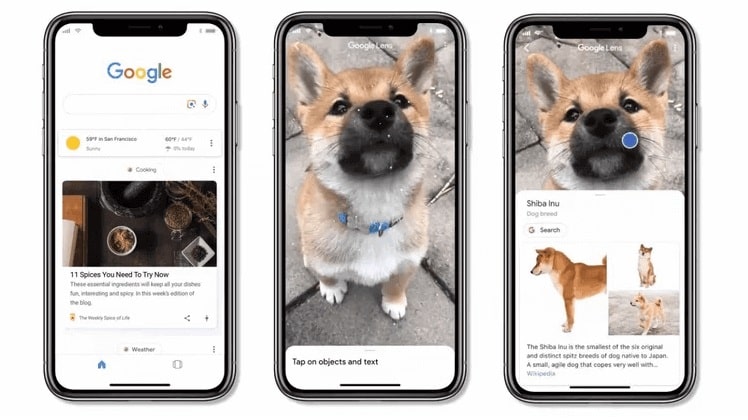
Visual search engines match the objects in a photo against an index of images and the data wrapped around them. Google Lens identifies products, landmarks, plants, and text in photos and connects shoppers to product pages; Circle to Search lets mobile users circle anything on screen to search it; Bing Visual Search offers similar camera-and-image matching; and Pinterest’s visual discovery drives shopping inspiration. Underneath, multimodal AI search, including Google’s AI Mode and Search Live, treats images as verifiable entities to reason about, which raises the bar on image quality and accurate metadata.
The key insight from Advanced Web Ranking’s visual search guide: there is no separate “Lens SEO” surface to game. You optimize the indexed image and the structured data around it, and Lens, image search, and AI surfaces all draw from the same well. Every section below serves all of them at once.
Start with photography that machines can read
Visual matching starts with pixels. Google’s product image guidance recommends a minimum of 1200 pixels on the longest side, and The Sharp Digital’s 2026 Lens guide notes Lens performs best on high-resolution images with clear subject isolation, with the subject occupying most of the frame. Blurry, tiny, or cluttered images simply do not match well, no matter how good the metadata is.
For product images, use clean, consistent backgrounds, even lighting, accurate color, and multiple angles, the same photography that converts shoppers also matches best in Lens. Add lifestyle or context shots as secondary images, but keep the primary product image clean and isolated. Use original photography rather than manufacturer-supplied images shared by hundreds of retailers: LSEO’s visual SEO research emphasizes that unique images per product help Google connect the visual to your page specifically. And never hotlink images you do not control; if the source changes or blocks the file, your matches vanish.
File names, alt text, and captions: the text pipeline
Search engines still read the text around an image to understand what it shows, so the classic signals all matter, done properly. Rename files before upload with short, descriptive names: “blue-suede-loafers-size-9.jpg” tells Google far more than “IMG_4471.jpg”. Write alt text that describes the image plainly for humans first, as Akselera’s visual SEO guide advises: be specific, keep it concise, use keywords naturally where relevant, and do not start with “image of” or “picture of”. Moz’s alt text guide remains the standard reference for getting this right.
Place images near relevant text and use captions where they add information: captions get read by users and engines alike, and nearby headings, specifications, and product details all help disambiguate what the image shows. For e-commerce, make sure the product title, description, price, and availability on the page all describe the same item the photo shows; inconsistency between the image and the page copy is a matching killer. Our website design optimization guide covers how this kind of page-level coherence lifts conversions too.
Structured data: tell search engines what the image is
Alt text describes what an image looks like; structured data declares what it is. Add image properties to the schema that fits the page: Product schema with the image URL plus brand, SKU, price, and availability for e-commerce; ImageObject for editorial images; Article or Recipe schema where applicable. Patrick Stox’s Google Images research notes that Product structured data feeds Google’s Lens and shopping surfaces directly, which makes it the highest-leverage markup for any store.
Two 2026 details worth implementing. First, Google expanded ImageObject with creditText, copyrightNotice, and creator properties, moving attribution beyond the older IPTC-only approach, per BlackSmith SEO; publishers of original photography should use them, and the license property gates the Licensable badge in image results. Second, keep every field truthful: schema that claims a price or availability the page does not show is a spam signal, not an optimization.
Formats, compression, and page speed
Compression is a visual-search issue, not just a performance one: artifacts are noise in the signal recognition depends on. Compress to balance size and clarity, serve modern formats, WebP or AVIF where your audience’s browsers support them, with JPEG/PNG fallbacks, and use responsive image sets so devices get appropriately sized files. Digital Applied’s 2026 image SEO guide names descriptive filenames, meaningful alt text, next-gen formats, structured data, and image sitemaps as the five pillars of a complete strategy, and all five show up in this article for a reason.
Keep Core Web Vitals in mind: heavy unoptimized images are the most common cause of slow pages, and slow pages rank worse and convert worse. Our web design industry guide covers the broader performance picture, and our SEO tips show how image optimization compounds with the rest of on-page SEO.
E-commerce: winning Google Lens product matches
For stores, visual search is a direct sales channel: a shopper photographs a product in the wild, Lens matches it, and the product page with the best match wins the click. The winning formula combines everything above with commerce specifics: unique high-resolution product photography on clean backgrounds, Product schema with image, price, availability, and SKU, consistent product data across the page and merchant feeds, and reviews markup where legitimate. Ignite Visibility’s Lens research stresses that photos, descriptions, product details, prices, and structured data must all tell a consistent story; any mismatch between what the image shows and what the data claims breaks the match.
Do not neglect Pinterest and Bing as secondary surfaces: Pinterest’s visual discovery reaches shoppers in inspiration mode, and Bing Visual Search at bing.com/visualsearch serves a meaningful share of visual queries. The same optimized images serve all of them.
Measure and maintain
Track image performance separately: Search Console reports on Google Images traffic distinct from web search, and product-page conversions from visual surfaces deserve their own segment in analytics. Re-crawl after major image changes, keep sitemaps current, and re-check that structured data validates after template updates, since theme and plugin changes silently break markup more often than anyone admits. Treat important images as durable assets with stable URLs: AgencyDashboard’s Lens guide warns against changing image URLs after indexing without proper redirects.
Frequently asked questions
What is visual search?
Visual search lets users search with images instead of words: photograph or upload a picture, and the engine finds visually similar results, product listings, or information about what is shown. Google Lens, Circle to Search, Bing Visual Search, and Pinterest’s visual discovery are the main surfaces in 2026.
How do I optimize my images for Google Lens?
Use high-resolution original photography (minimum 1200px on the longest side) with clean backgrounds, descriptive filenames and alt text, Product or ImageObject structured data with the image URL, and an image sitemap. Keep the page copy, price, and availability consistent with what the photo shows.
Does alt text still matter for visual search?
Yes. Alt text, captions, and surrounding copy form the text pipeline that retrieval systems use alongside visual matching. Write alt text that describes the image plainly for humans, keep it concise, use keywords naturally, and avoid starting with ‘image of’.
What structured data helps with visual search?
Product schema with the image property for e-commerce, ImageObject for editorial images, and Article or Recipe schema where applicable. Include truthful details like brand, SKU, price, and availability on Product markup, and use the ImageObject license, creditText, and creator properties for original photography.
Do I need an image sitemap?
It is strongly recommended for sites with large image catalogs or images loaded in ways crawlers might miss. List important images with absolute URLs, include CDN-hosted images, keep the sitemap current, and make sure image URLs are crawlable without login or JavaScript rendering.
How does visual search help e-commerce sales?
Shoppers photograph products they discover offline or on social media, and visual search matches the photo to purchasable listings. Stores with unique high-resolution photography, accurate Product schema, and consistent product data win those matches, turning inspiration directly into product-page traffic.
Visual search rewards the same discipline good SEO always has: clear, honest signals about what your content shows. Photograph well, describe accurately, mark up truthfully, and keep the technical foundations clean. Do that, and your images work for you across Lens, image search, Pinterest, and whatever multimodal surface comes next. For the broader picture of making the site itself convert that traffic, see our web push notifications guide on bringing visitors back.
